The Apple Watch Ultra: 3 steps ahead
INTRODUCTION
While Apple’s annual September event is usually considered an iPhone event, I think that this year’s event will be viewed as more of an Apple Watch event. The iPhone 14 was a nice upgrade, but not super exciting. Dynamic Island aside, the biggest news from the event was the Apple Watch Ultra.
As an Apple Watch owner whose last (and thus far, only) upgrade was from a Series 2 to a Series 4, the general year-by-year upgrades in the past were interesting but not compelling, until the Ultra.
MY WATCH HISTORY
Series 2
I was somewhat interested in the Apple Watch when it first came out, but not enough to purchase the original. However, the nifty animation of the speaker ejecting water in the Series 2 introduction sold me, and this became my first Apple Watch.
The Series 2 also upgraded the processor (dual core), added standalone GPS, and upped the screen brightness (1000 nits) and water resistance (50m) to what are still the current levels in the Series 8.
Series 4
The Series 4 introduced a bigger screen, 50% louder speaker, Bluetooth 5.0, a 64-bit processor (“up to twice as fast as S3”), better GPS (adding Galileo & QZSS), and kept the barometric altimeter and cellular connectivity from the Series 3, making it a somewhat compelling upgrade from the Series 2.
After the Series 4, I lost interest in the yearly watch upgrades. I wasn’t really getting much utility out of the Series 4 as it was. I had stopped running due to some foot issues, and just didn’t really think it was worth the watch tan. Battery life was becoming an issue - most days would end with 18% or lower battery levels, and I ran out more than once. Because of this, and because of the pandemic, I had stopped wearing it altogether by 2020.
Killer Feature
The one killer feature that brought me back? Using the Apple Watch to unlock your phone while wearing a mask, very useful while grocery shopping and needing to look at the shopping list. This feature came out on April 26th, 2021, and was such an instant success for me that I started wearing my watch again daily. It was one of those features that was so immediately internalized that I was shocked to find out that it had only come out in April 2021 - my brain was so sure it was around in 2020, I had to double verify the release date.
But now that it was on my wrist again, I just never really felt the need to upgrade because the yearly upgrades seemed “nice” but not essential. Especially since, over several software upgrades, the battery in the watch seemed to last longer. I was now ending days at 30-40% battery remaining, to the point where I just didn’t need to worry about it anymore.
APPLE WATCH YEAR OVER YEAR
Here are most of the upgrades in each model year, from Series 5 to Ultra. I’ve kept the numbering contiguous across all the non-Ultra models:
Series 5 upgrades (from Series 4)
- Always-on display
- Compass
- 2x storage (32 gig)
- Haptic feedback on the digital crown (which I could swear was on my Series 4).
Series 6 upgrades (from Series 5)
- U1 ultra-wideband
- Blood oxygen monitoring
- 2.5x brighter always-on display (i.e., when not active. Active display still the same)
- Always-on altimeter
- New S6 processor, about 20% faster than S4/S5
Series 7 upgrades (from Series 6)
- Bigger screen 484x396 (vs 448x368) / smaller borders (1.7 vs 3 mm)
- Crack resistant front crystal
- IP6X dust resistance
- Fast Charging
- Up to 70% brighter indoors in always-on mode.
- Add BeiDou to GPS networks
Series 8 upgrades (from Series 7)
- More powerful gyroscope and HDR accelerometer
- Crash Detection
- Body temperature sensor
- Wrist temp in sleep
- Cycle tracking
- Bluetooth 5.3 (small update from Series 4-7 Bluetooth 5.0)
 Compare this list of 21-ish updates and features added to the line from Series 4 to Series 8, with the list of updates and features added on top of this list from Series 8 to Ultra:
Ultra upgrades (from Series 8)
- Titanium material
- Action Button
- Flat Display
- Brighter screen 2,000 nits brightness (compared to 1000 from Series 2 - Series 8)
- Bigger Screen 502x410 (vs 484x396)
- Wayfinder watchface
- Louder Speakers (40% louder than Series 8)
- Three Microphone array (with beam forming and wind noise mitigation)
- 86-dB Siren
- Dual-Frequency GPS (L1 + L5)
- Water Resistant to 100m (compared to 50m from Series 2 - Series 8)
- Water Temperature sensor
- Depth Gauge
- Larger Battery (approximately 2x life)
- Protective case (raised edge to protect screen, crown guard)
This is essentially the same number of updates added to Series 5, 6, and 7 combined! Or about 3 year-over-year improvements, all in one upgrade. When viewed from this perspective, it really does seem like a big achievement.
Sources:
https://www.macrumors.com/guide/apple-watch-series-5-vs-apple-watch-series-6/
https://www.macrumors.com/guide/apple-watch-series-6-vs-apple-watch-series-7/
https://www.macrumors.com/guide/apple-watch-series-7-vs-series-8/
https://www.macrumors.com/guide/apple-watch-series-8-vs-apple-watch-ultra/
https://www.kenrockwell.com/apple/watch/compared.htm
DECIDING ON A NEW WATCH
I wasn’t entirely convinced of purchasing a new watch this year, but I was going back and forth between Series 8 and Ultra minute by minute. The biggest issue was size - I have big wrists, but when I made a paper mockup of the Ultra, it seemed ridiculously huge.
WEB DECISIONS
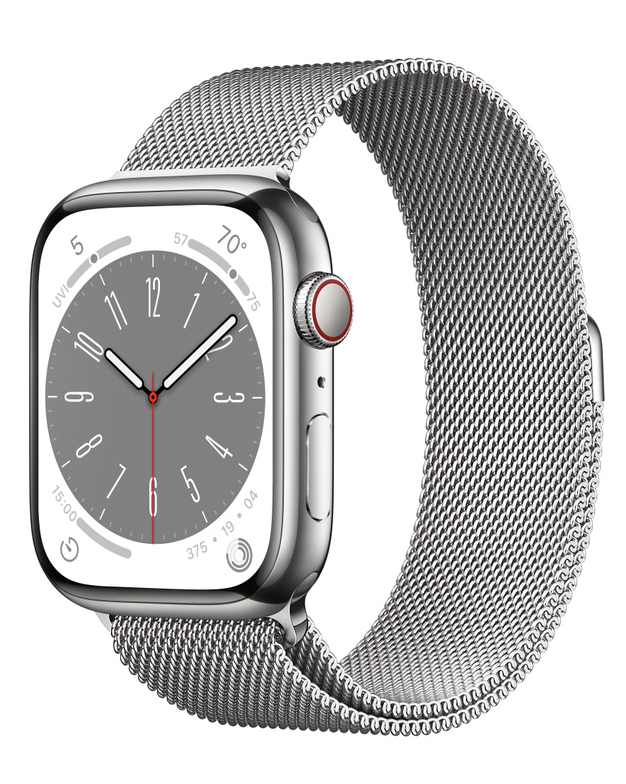
In the process, I started to look at the stainless steel Series 8 with silver Milanese Loop - it looks really clean and classy and would be a nice daily accessory.
Uncertainty crept in. I had ordered an Ultra with the Trail Loop (now set to deliver late October / November). I had also ordered a midnight Series 8 with a black Sport Band. But this stainless steel watch with the Milanese band looked incredibly nice.
With resignation, I canceled both orders and made myself commit to going in and seeing in person before deciding.
IN STORE DECISIONS
I was lucky enough to get to an Apple store on launch day. My main observations:
- The stainless steel watch that looked so good in a web photo was incredibly shiny in person. So shiny that I immediately rejected it as an option.
- The new-to-me extended screen from the Series 7 & 8 with the refracting edge looked incredibly unappealing. I’m sure I would have gotten used to it, but I was surprised by my viscerally bad reaction to it.
- The Trail Loop, the most popular or, possibly, just the most supply-constrained of the new Ultra bands, looked far more unappealing to use in person, and made me glad I hadn’t been able to order one for day 1 delivery.
- The Alpine Loop, the band that I didn’t think I wanted, looked much better in person, and felt incredibly comfortable once I put it on.
- The Ultra did not seem as big as the paper mockup I made, and as soon as I put it on all concerns about size went away. It felt light and very natural, a perfect fit.
With this in mind, I ended up walking out of the store with an Ultra and a green Alpine Loop. Not what I had imagined I would have wanted, but there is no substitute for in-person hands-on experience.
ACTUAL USE
The Ultra feels very comfortable, and feels lighter than the Series 4, even if it is actually almost twice as heavy (61.3g vs 36.7g). In general, everything is easier to do on this watch, and I love the flat screen. When going back to my old watch, the rounded edges of the Series 4 screen feel out of place all of a sudden.
Maps on WorkOutDoors are totally readable, and all the various bits of information are easy to see. I turned off the always-on display, but raise to wake seems to work much better than the Series 4. On my bike, the bigger screen and more reliable raise to wake makes it practical to do a quick stats check on the workout app.
Battery is really quite good, and I usually can go 2 days between charges, even when I limit my charging to 80%. On one stretch, I managed to go 3 days on a single full charge, ending day 3 at 12% (in low power mode). That stretch included a 4-mile run and two 8-mile bike rides with activity tracking. The run was done without proximity to my phone, so the Ultra had to use its own GPS for run tracking. Three days is quite incredible. I remember my Series 2 almost died on a 3-hour hike w/GPS, and the Series 4 also had some challenges making it through the day.
In total, I really do enjoy this upgrade. The main features I really like, in order of preference:
- Amazing Battery Life
- Flatter Screen
- Brighter Screen
- Bigger Screen
- Compass App
- Alpine Loop
- Brighter Flashlight
- More Accurate GPS (ok - I haven’t actually noticed a difference with this one, but in my mind it’s a bonus)
For all the worrying I did about “is this watch too big for me”, it really isn’t a big deal. Absolutely no one except my seven-year-old son noticed or said anything about it, and I do see a lot of the same people most days.
This quote from John Gruber sums it up perfectly:
“...if you’re thinking ‘this is too big for me’ because you’re worried about how others will think it looks on your wrist, you’re overthinking it. If you like it, wear it.”
COMPLAINTS
As good as the Ultra is, here are some complaints.
- The Digital Crown is big enough to dig into my wrist / mess with my arm hairs. The Series 4 did not have this issue.
- I did a little wood trimming while wearing it, and some sawdust got trapped in the edge of the screen. It took about two weeks for it to finally get out. I’m sure one swim in the pool or ocean would have cleared it out, but even a few showers didn’t dislodge the sawdust.
- It does not charge in the dock I use for the Series 4. The bulge on the back is a bit larger and it doesn’t fit close enough. Taking the MagSafe charger out of the dock works just fine. I don’t know if it would be the same issue as the Series 7 or 8.
- I set the action button to start the flashlight. However, I want it to start on the red flashlight, not the white. I cannot find a setting to change the default flashlight. As it is now, I have to start the flashlight (which immediately goes to full blinding white brightness) before it realizes I’m looking at it and dims, which then allows me to swipe to the red flashlight. Maddening. Also, the action button will always start the flashlight - I would prefer it to do the flashlight if on the home screen, but pause the workout if in workout screen, add a waypoint if in compass screen, or do something custom in third-party apps.
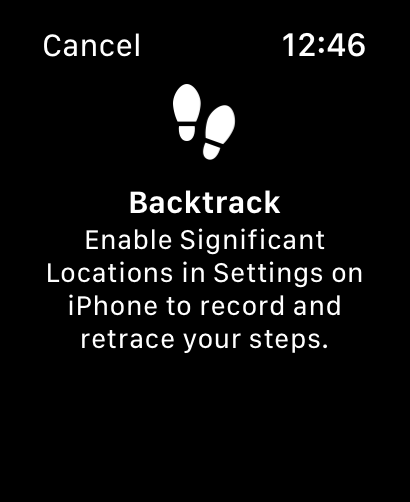
Others have pointed out that if it is set to launch another app, and you are in the workouts app, it will stop the workout and switch to the other app. That seems bad. - When in the compass screen, I wanted to try the backtrack feature, and got the following error message. I would have hoped that this would be something to enable the first time you start the compass app, or during initial setup.
- After solving the backtrack error issue, I noticed another software issue - I wanted to record a workout, and then switch to the compass app for navigational assistance. As soon as I dropped my wrist, however, the watch reverted to the workout app, not the compass. This seems incorrect - if I have a wayfinding app in the foreground, it should stay there until I switch away. Automatically switching back to the workout stats is not helpful when trying to navigate unfamiliar hills. This could possibly be an additional option for the action button - switch between the last two apps, or a set of apps.
- The Backtrack app was very disappointing - the track disappears after you use it, and the WorkOutDoors app shows breadcrumbs over the map, providing the same utility while doing saveable workout tracking and showing a map. Much better. Maybe I just don’t understand the backtrack app, but I was hoping it would be very intuitive.
CONCLUSIONS
I’m not entirely sure I need the Ultra, but I do appreciate having it. I’m using it as a prod to get back to fitness work and outdoor adventures. In fact, the first thing that came to mind was one of those “walk across Scotland” trips that I’ve been thinking about doing for the last 10-15 years. But then David Smith goes and does it with his usual incredibly quick production times and attention to detail.
Aside from that, the Ultra still inspires me to take my daily bike or run or hike up a notch, and I am getting utility out of it. I do like that it has a better heart sensor, a better blood oxygen sensor, crash detection, and the fact that this is the first Apple Watch to upgrade screen brightness and water depth rating since the Series 2. I don’t really care about the specialty diving stuff, and am not sure what .3 more Bluetooth does for me, but I would not turn these features away either.
I’m hopeful that many of these early software issues get taken care of. The action button, in particular, does not operate how I think it should. But even as it is now, today, it is the most comfortable and useful Apple Watch yet. It’s not a revolutionary leap, but does take the Apple Watch line several big steps ahead.
Other reviews: